Wordfence operations for agencies
One Wordfence alert queue for every WordPress site you manage
Wordfence emails one site at a time. WPSecureOps collects completed scans from every client install into one WordPress security dashboard, sorted worst first, so your team knows which client needs attention before opening dozens of separate inbox threads.
- $0during early access
- GPLv2+connector source is inspectable
- Free + Premiumworks with either Wordfence licence
- Tenant scopedclients see only their assigned sites
| Severity | Finding | Detected |
|---|---|---|
| Critical | Unauthenticated file upload in a page-builder plugin
wfPluginVulnerable · Wordfence severity 100 |
today |
| Critical | Backdoor uploader found in the uploads directory
knownfile · Wordfence severity 100 |
today |
| High | Database credentials exposed in a wp-config backup
publiclyAccessible · Wordfence severity 80 |
yesterday |
| High | Administrator created outside WordPress
suspiciousAdminUsers · Wordfence severity 75 |
yesterday |
| Medium | Firewall still in learning mode after install
wafStatus · Wordfence severity 50 |
3 days ago |
- Collected from
- every enrolled install
- Scan check
- every 5 min
- Delivery
- every 1 min, with backoff
- Sheet
- specimen — not live data
The actual product
See the Wordfence dashboard and client report before you connect a site
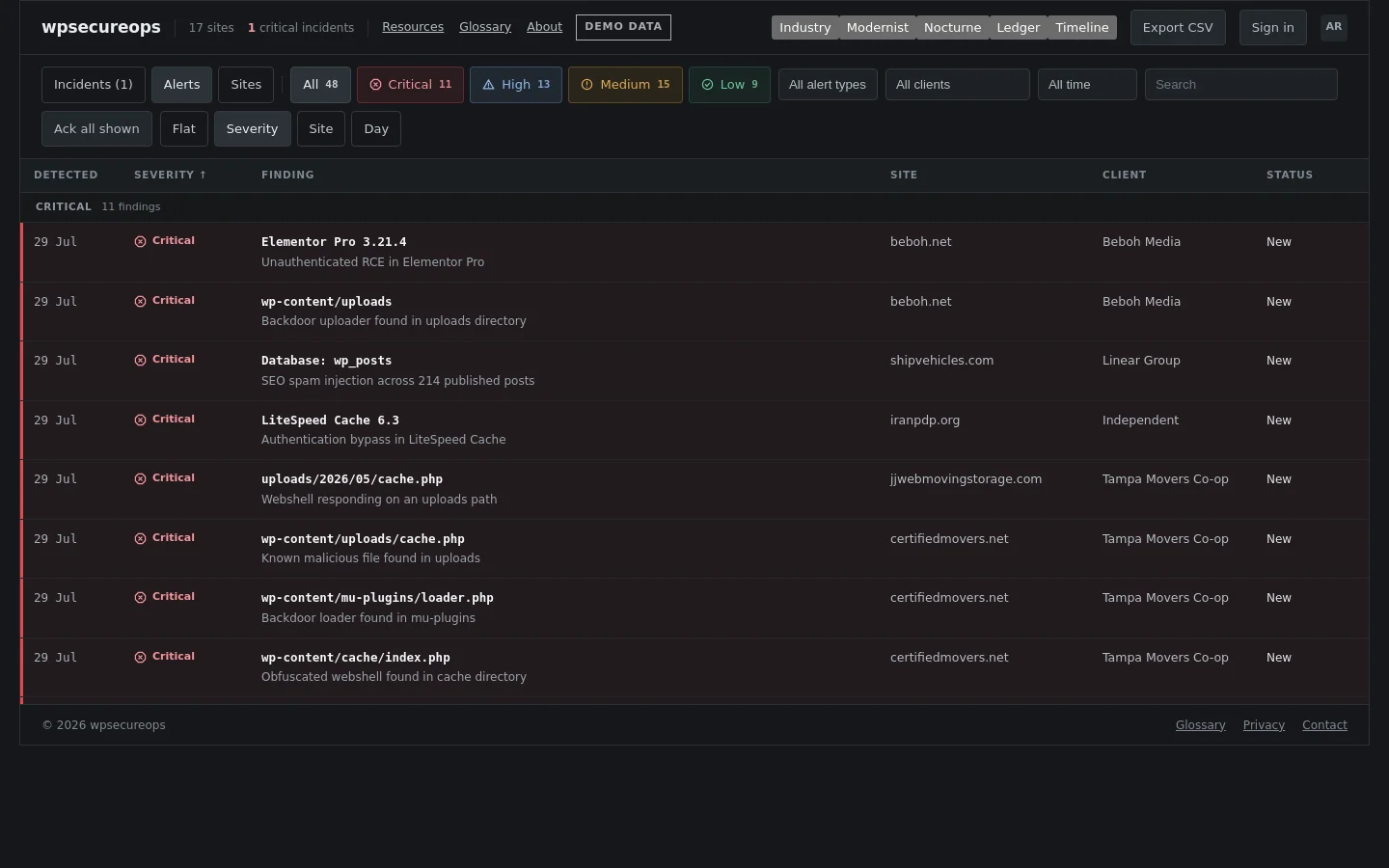
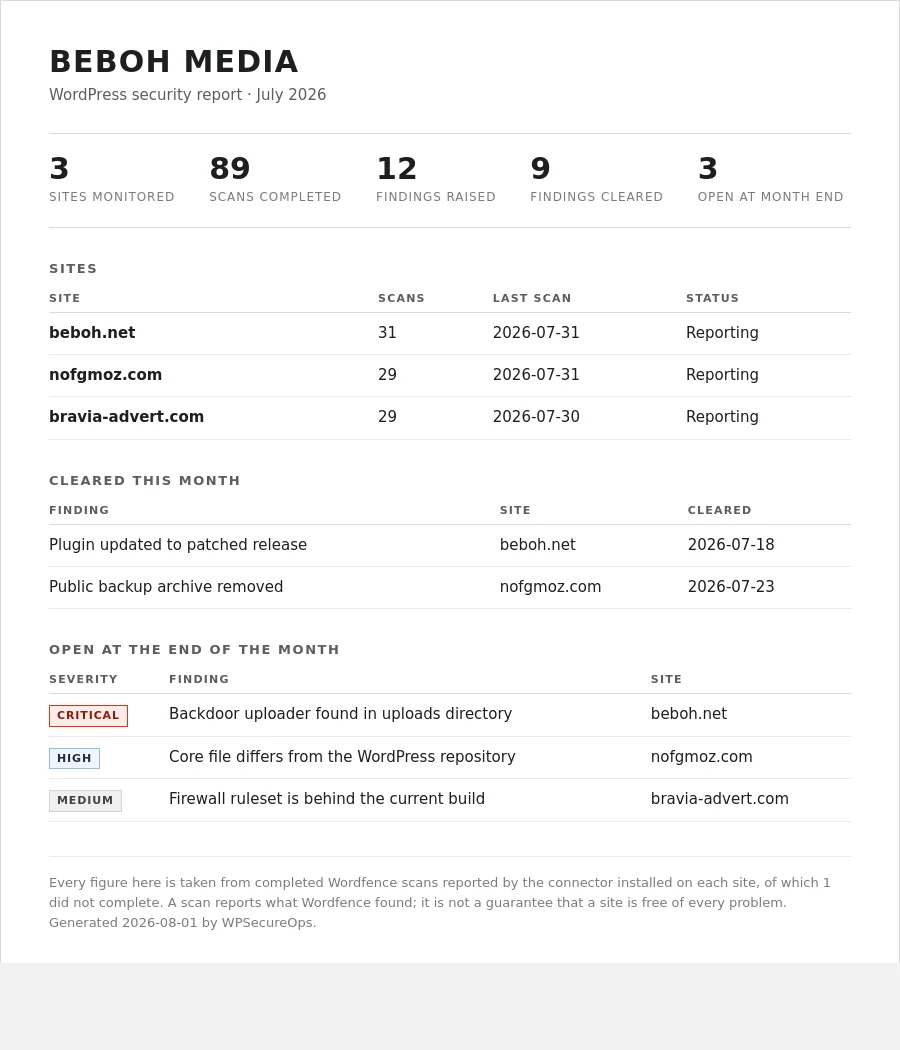
These are real WPSecureOps screens using demonstration data. The console is the operator's daily queue; the monthly report is the quieter, client-facing record of scans, findings and cleared work.
Who it is for
A WordPress security dashboard for agencies and freelancers
WPSecureOps is for people accountable for more WordPress sites than one inbox can explain: agencies on care plans, freelancers holding maintenance retainers, and internal teams with a distributed WordPress estate. Client labels keep ownership visible while one fleet-wide queue preserves a single order of urgency. Read the guides to managing Wordfence across multiple sites for the operating model behind it.
- Agencies
- Group sites by client, route notifications to the right channel and give each client a read-only view.
- Freelancers
- Start the day with one severity-sorted work list instead of an inbox thread per maintenance site.
- Internal teams
- Keep scan history and surface installations that stop reporting, even when their last scan looked quiet.
What lands in the queue
Wordfence's findings, grouped so they can be worked
WPSecureOps maps all 36 Wordfence issue types handled by the connector into six security categories, a separate Scan health view and four severity bands. A queue spanning dozens of sites can be filtered, grouped and worked through instead of read one email at a time.
| Category | Types | Examples | What it means |
|---|---|---|---|
| Malware | 10 types | file, knownfile, database, checkGSB | A known signature matched, or the site is flagged by Google Safe Browsing. Treat as active compromise. |
| Vulnerability | 7 types | wfPluginVulnerable, wfPluginAbandoned, wfUpgrade | A component is inside a known-affected version range, abandoned, or simply behind. |
| Public files | 4 types | publiclyAccessible, configReadable, dbBackup | Something that should never be reachable over HTTP is being served with a 200. |
| File change | 4 types | coreUnknown, coreFile, pluginFile, themeFile | A file no longer matches the copy it was distributed as. |
| Login | 3 types | easyPassword, suspiciousAdminUsers | Weak credentials, or an administrator that appeared without going through WordPress. |
| Firewall | 3 types | wafStatus, checkHowGetIPs, geoipSupport | The firewall is running but not at full protection on that install. |
| Scan health | 5 types | timelimit, diskSpace, skippedPaths | The scan itself ran into a limit or incomplete state, so a quiet result cannot yet be treated as complete coverage. |
Where a finding goes
Routed to the channel that owns the site
A finding does not have to wait for somebody to open the console. New findings are forwarded to Slack, Telegram, email or any webhook, at a severity threshold you set per destination — and a destination can be scoped to one client's sites, so a channel sitting in that client's own Slack never sees another client's findings.
| What is forwarded | When | To whom |
|---|---|---|
| New findings | The first time a fingerprint appears on a site, batched one message per scan. A re-scan of something you already know about stays silent. | Destinations above your severity threshold, scoped to that site's client label. |
| Silence | A connector that stops reporting for a day, or Wordfence being switched off on a site that is otherwise checking in. | Every destination for that client — no severity threshold, because a site that stopped reporting has no severity. |
| Weekly summary | Monday mornings: sites scanned, findings raised, findings cleared, anything that stopped reporting. | Destinations that opted in. |
| Monthly report | One printable page per client per month, shareable by an expiring link that needs no account. | Whoever pays the retainer. |
Accounts come in three kinds. Admins manage sites, users and destinations. Members triage the sites they own. Clients get a read-only view of their own sites and nothing else — no other client's findings, no fleet, no settings.
Connecting a site
Connect each WordPress site in three steps
-
1
Install the connector
Upload the WPSecureOps plugin to the WordPress site and activate it. It carries no credentials, so the same file goes on every site.
-
2
Press Connect
Under
Settings → WPSecureOps, one button. The site registers itself and asks to join. Nothing to copy or paste. -
3
Approve it
The site appears in your pending queue. Approving it proves you control that domain before a single finding is accepted.
The privacy boundary
What actually leaves a client's site
You are asking clients to let a plugin report on their security posture. It is worth being precise about what that plugin sends, so here is the whole list. The full retention, account and deletion details are in the privacy notice.
It sends
- +Site name and URL
- +WordPress, Wordfence and connector versions
- +Scan completion time and status
- +Issue type, severity and state
- +Title and description, HTML stripped
It never sends
- −WordPress credentials
- −Wordfence license keys
- −File contents
- −The raw Wordfence issue object
- −Absolute server paths — the site root is replaced with
[site-root]/
Wordfence Central alternative
Alert triage and fleet configuration are different jobs
Wordfence Central is built to manage configuration, licences and scan status across sites. WPSecureOps is built to put the findings those sites report into one cross-site work queue. Some agencies need one, some need the other, and many can use both without conflict.
- Use Central for
- Fleet configuration, templates, licences and Wordfence-native site management.
- Use WPSecureOps for
- One cross-site alert queue, per-client routing, triage state and reporting-gap detection.
- Use both for
- Standardised configuration plus a single operational queue for the findings it produces.
Early-access pricing
Free at present. No card. No automatic billing later.
WPSecureOps currently costs $0. If pricing changes, existing accounts will be told before any fee applies and nothing will start billing automatically. Those commitments are also written into the terms.
Reference
What does this Wordfence finding mean?
Every issue type a Wordfence scan can raise, explained: what was actually detected, why it matters, and the steps to clear it. Written for whoever is holding the queue.
- A plugin has a known security vulnerabilitywfPluginVulnerable
- A file appears to be maliciousfile
- A config, backup or log file is publicly accessiblepubliclyAccessible
- An administrator was created outside WordPresssuspiciousAdminUsers
- An unknown file was found in a core directorycoreUnknown
- The firewall is not at full protectionwafStatus
Questions before connecting a site
Wordfence dashboard FAQ
- Does WPSecureOps replace Wordfence?
- No. Wordfence still performs the firewalling and security scans on each WordPress site. WPSecureOps collects the findings from those completed scans and gives your team one place to triage them.
- Is this a Wordfence Central alternative?
- It is an alternative for cross-site alert triage, not for every Wordfence Central feature. Central manages Wordfence configuration and licences across sites; WPSecureOps turns findings from all sites into one severity-sorted work queue. The two can run together. Read the full comparison.
- Does it work with free Wordfence or only Premium?
- It works with both Wordfence Free and Wordfence Premium. The connector reads completed scan results; your Wordfence licence still determines which Wordfence rules, signatures and other features are available on the site.
- How many sites can I connect?
- There is no published per-site cap during early access. WPSecureOps is designed for agencies and freelancers managing many WordPress installs; contact us before connecting an unusually large fleet.
- What data leaves my client's site?
- The connector sends site and software versions, scan status, and the type, severity, state, title and stripped description of each finding. It does not send credentials, licence keys, file contents, database contents, visitor data or raw Wordfence issue objects. Absolute server paths are replaced before delivery. See the full data boundary.
- How much does it cost?
- There is no charge at present and no payment details are collected. Existing accounts will be told before any future fee applies, and nothing will start billing automatically.
- Do my clients see each other's sites?
- No. Client accounts are read-only and scoped to the sites assigned to that client. They cannot see another client's findings, the wider fleet or operator settings. Notification destinations can also be scoped to one client label.