Guides · For agencies
Too many Wordfence emails? What to turn off and what to keep
Wordfence can email about scan findings, firewall events, password use, administrator sign-ins and service state. Multiplied across a fleet, those individually defensible alerts become a stream no one reads. The fix is not a mail rule that hides everything. It is deciding which messages require action today and which belong in a summary.
Why the volume explodes
A fresh Wordfence install enables most security-event alerts: scan issues, deactivation, the firewall being turned off, blocked IPs, login lockouts, breached-password attempts, valid lost-password requests, administrator sign-ins, and increased attack rate. Automatic-update mail and non-admin sign-in mail are off by default, but that still leaves enough enabled switches to overwhelm a busy site or an agency inbox.
Volume itself becomes an operational vulnerability. A backdoor alert has the same sender and similar subject-line weight as a hundred messages saying the firewall blocked traffic exactly as designed. Once the reader learns that most Wordfence mail requires no decision, the important message is punished by the noise that came before it.
Open the Wordfence Email Alert Preferences
In WordPress, go to Wordfence → All Options → Email Alert Preferences. Expand the panel, make the changes below, and use Save Changes at the top of the page. The recipient lives in a different panel: Wordfence → All Options → General Wordfence Options → Where to email alerts.
Take a screenshot or export the finished configuration before rolling it out. On a fleet, that reference is what lets you tell a deliberate exception from quiet configuration drift six months later.
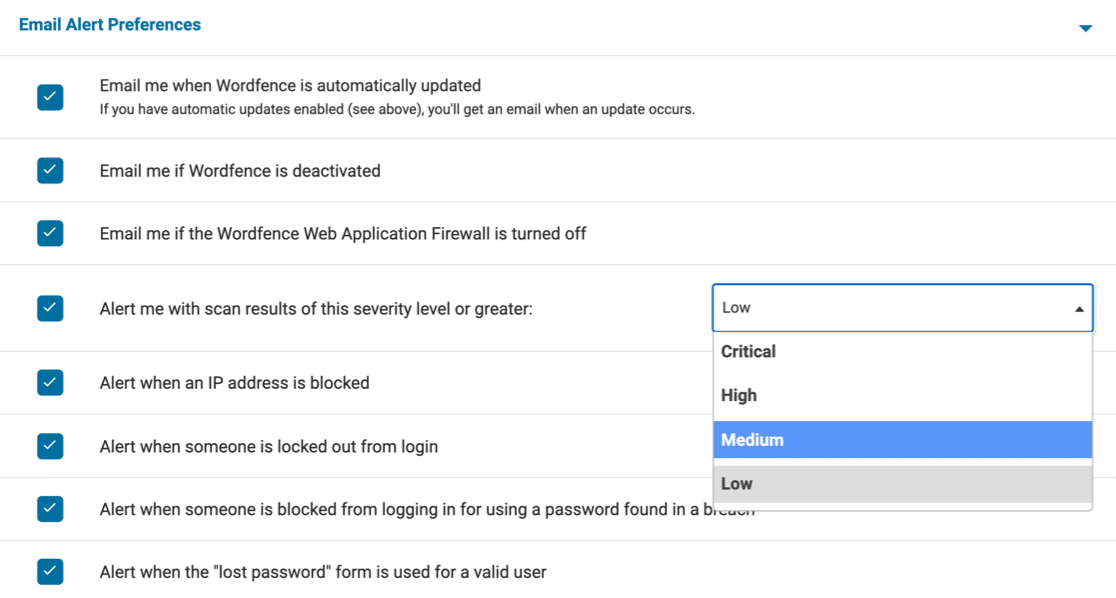
Wordfence email settings: switch by switch
This is a managed-site baseline, not a universal prescription. “Keep” means the email can reasonably trigger same-day action; “Off” means the information should still be reviewed in Wordfence, a central console, or the weekly activity report. Defaults below are from the current Wordfence 8.x configuration for a fresh installation. Sites upgraded from older releases can retain previous values, especially the hourly cap.
| Switch | Fresh default | Recommended | Why |
|---|---|---|---|
| Wordfence automatically updated | Off | Off with managed updates | Your maintenance system should verify versions; turn this on only if no other process does. |
| Wordfence deactivated | On | Keep on | Unexpected deactivation removes both visibility and protection. |
| Web Application Firewall turned off | On | Keep on | A disabled WAF is a protection-state change, not routine traffic. |
| Scan results at this severity or greater | On · Low (25) | High (75) | Critical and High findings interrupt; Medium and Low stay available for scheduled review. |
| IP address blocked | On | Off | A block usually means the firewall worked. Review the aggregate, not every source IP. |
| Someone locked out from login | On | Off | Internet-facing login pages accumulate lockouts that rarely need one-by-one action. |
| Login blocked for a breached password | On | Keep on | A real account used a known-breached password; reset it and review that user's access. |
| Lost-password form used for a valid user | On | Off on busy sites | This is common user activity. Investigate patterns in aggregate unless the site is unusually sensitive. |
| Administrator signs in | On | New devices only | Keep the parent switch on and enable its child option to suppress familiar-device logins. |
| Non-admin user signs in | Off | Off | Membership and commerce sites can generate a message for every customer session. |
| Large increase in attacks | On | Usually off | It reports blocked traffic volume, not proof that an attack succeeded. |
| Maximum alerts per hour | 5 | Keep 5 | The cap prevents a burst from monopolising the mailbox; older upgraded sites may still be unlimited. |
What should stay on
Keep Wordfence-deactivated and WAF-turned-off alerts. Silence caused by the security plugin itself being disabled is the one silence you cannot safely interpret as calm. Keep the breached-password login alert too: the attempt was blocked, but the account owner is demonstrably using a credential already present in breach lists and needs a reset.
Keep scan-result email enabled and set “Alert me with scan results of this severity level or greater” to High. Wordfence's native levels are Critical 100, High 75, Medium 50 and Low 25. The threshold changes what interrupts you by email; it does not remove lower-severity findings from the scan results. Medium maintenance work can remain visible for the weekly queue without competing with malware or exposed credentials in today's inbox.
What the Increased Attack Rate email really means
The subject usually reads “[Wordfence Alert] Increased Attack Rate”. It is generated when Wordfence sees a burst of requests blocked by firewall rules or the global IP blocklist. That is evidence of hostile traffic, but it is also evidence that the firewall is handling that traffic; by itself, it is not evidence that the site was compromised.
For a managed fleet, turn this switch off unless an immediate traffic spike changes what the team will do. Use firewall statistics, Live Traffic, hosting metrics, or a central event view to assess patterns without one message per burst. Keep it on for a quiet, high-value site only when someone has agreed to inspect unusual traffic immediately — and remember that the response is investigation, not manually blocking every address already handled by Wordfence.
Use the Email Summary as the weekly layer
Below Email Alert Preferences, Wordfence exposes an Activity Report with an “Enable email summary” option. It is on weekly by default on a fresh install, and can run daily, weekly, or monthly. Weekly is the useful interval for a managed site: frequent enough to show trends, quiet enough to remain a summary rather than another alert stream.
The report aggregates recent security activity and recently modified files. Leave Wordfence's default exclusions for wp-content/cache and wp-content/wflogs unless you have a reason to inspect those high-churn paths. The summary does not aggregate across installations, so twenty sites still produce twenty reports; route them to a folder reviewed in one weekly session, or replace that layer with a cross-site dashboard that someone actually opens.
The failure mode of over-muting
Do not turn every switch off, forward the remainder to an unread folder, and call the inbox solved. Every disabled category needs a replacement: a weekly review slot, a dashboard owner, a last-scan check, or an activity report. An alert disabled without a replacement is a decision not to know.
Use a simple test for every message type: what would we do if this arrived? If the answer is “nothing, because Wordfence already blocked it”, aggregate it. If the answer is “change a password, investigate a new finding, or restore a protection control today”, keep the interruption. Revisit the decision after the first month using actual volume rather than fear of what might be useful.
Past a handful of sites, stop tuning inboxes
Every recommendation above is per-site configuration, multiplied by the fleet and exposed to drift as new clients arrive. Past roughly ten sites, keep the shared mailbox as an audit trail but work from a console that can sort findings across sites. Wordfence Central and WPSecureOps take different approaches; the important change is replacing forty independent subject lists with one owned workflow.
Test the final route end to end. Wordfence uses WordPress mail, so a saved address and enabled checkbox do not prove delivery. Send a test from Wordfence → Tools → Diagnostics, verify it reaches the shared destination, and make failed delivery visible through the site's SMTP or transactional mail system.
Common questions
- How do I change the Wordfence alert email address?
- Open Wordfence → All Options → General Wordfence Options and edit “Where to email alerts”, then save. Wordfence accepts multiple recipients separated by commas. For an agency, use a monitored shared address rather than a person's mailbox, and send a test email from Wordfence → Tools → Diagnostics so a correctly saved setting is not mistaken for confirmed delivery.
- How do I stop Wordfence admin-login emails?
- Open Wordfence → All Options → Email Alert Preferences. Either turn off “Alert me when someone with administrator access signs in”, or leave it on and enable the child option that alerts only when the administrator signs in from a new device. The second choice preserves a useful anomaly signal without emailing for every familiar daily login.
- Will I miss a hack if I set scan email to High?
- The setting changes the minimum severity that triggers scan-result email; it does not delete Medium or Low findings from Wordfence. Critical and High results still interrupt you, while lower-severity maintenance items remain in scan results and central dashboards for a weekly review. The safe setup therefore requires that the scheduled review genuinely happens and checks last-scan health too.
Referenced in this guide
- A user has an easily guessed password Login
- Other incomplete scan status messages Scan health
- The site is flagged by Google Safe Browsing Malware
- Wordfence alert explainer Free tool
The other guides
- How to manage Wordfence across 10, 20 or 50 client sites
- Wordfence alert triage: how to prioritize scan findings
Primary references
Product behaviour and remediation guidance were checked against these primary sources.